6. Build Your Website With Live Citation Feature
For using Equation-Citator to build a fully working website with live citation features, an example can be directly found in website docs tutorial, for the source code of full website, check full website source code for details.
1. Introduction
(1) How to build a web note repo with Citation?
We added support for the website note support in version v1.3.5. Since it’s not easy to build a markdown-it extension that support all multi-continuous citation + cross-citation preview function like Equation Citator. We can use the element-rendered citations In the web-based note export, which will need batch export markdown files with the citation meta-data.
Our solution is to specify a website notes export folder and provide batch-export command to sync the notes into web-notes folder. To specify it, use settings > categorical > PDF export > Website notes export folder. You should ensure a folder is empty before setting it to export folder.
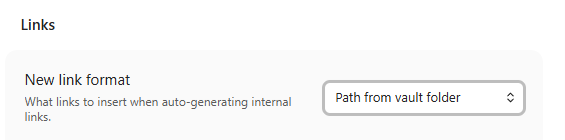
To ensure the path is resolved correctly, please ensure all links use the relative path from the vault folder. This is set in Settings > Files and links > New link format. If you use shortest link, you will need to update all the links.
(2) Before running batch-export
To ensure the meta-data is preserved, check settings under settings > categorical > PDF export carefully :
-
Inject citation metadata in exported markdownmust be selected to make sure the necessary meta-data is injected into exported elements -
Add Image Caption in PDFandAdd Image Description in PDFshould often be deselected. Since it’s better to specify the styles of title/description rendering. -
Keep Image spacing for PDFshould often be selected, since many markdown-it renderer renders the image with the nearby text as one line.
We only export markdown files and it’s referenced attachments during exporting to website process.
There are another 2 settings :
- Direct-copy markdown file patterns : We parse the images and citations with grammar
$\ref{}$. But for files likeexcalidrawmarkdown, these files shouldn’t be processed. So we can specify the markdown file format that need to be directly copied. - Exclude folders : For some auxiliary folders, if you don’t want to export them together, you can specify the folders that not need to be exported. However, by default, if there are links that points to the excluded folder, it will be deemed as attachments and still be exported. So you may turn on
Completely ignore linked filesfor specific folder to ignore files in those folder when there are links on it.
Then, you can sync a file/a folder/the entire repository to the destination website-export folder.
- Run command
Sync repository to the website notes folderto batch export all notes in repository. - If your repository is too large and you want to only sync a file, Run command
Sync current file to website notes folder. - Right-click on folders/files at
Filestree and selectsync file/folder to website notes folder
When exporting, this plugin will create a .equation-citator-export-index.json file to track the exported files. Files not in this list will not be deleted on the next export.
(3) Use the npm package to resolve citations
To resolve the metadata, we build an npm package to resolve the links and inject the previews into webpage. This package includes markdownIt Plugin and runtime Extensions. This package provides you with following functions :
-
Markdown-it sub-package
- Build-time integration for Markdown-it.
- Adds wrappers and target metadata to equations, figures, and callouts.
- Generates stable IDs from equation tags or injected metadata.
- Resolves Obsidian links, embeds, and cross-file citation URLs.
-
Runtime sub-package
- Browser runtime for interactive citations.
- Assigns stable target IDs after page load.
- Resolves same-page and cross-file citation targets.
- Provides hover previews, preview navigation, and jump-to-target behavior.
Note the compatibility is equation-citator-webnote (npm package) v1.3.xx is compatible with obsidian-equation-citator v1.3.x.
You can install it by :
npm i @friedparrot/equation-citator
You will need to use following :
md.use(equationCitatorMarkdownIt, {
  pathMapping: [
	// website link path of repo - absolute repo path against your project folder
    { 'your-website.com/knowledge-base': 'docs/knowledge-base' }
  ]
})
We note you may also need to ensure the option logEmbedLinkRemapping: true to ensure all the images are correctly linked.
The runtime.js and runtime.js.map file should be copied to the assets while building the website.
Additionally, since this package has auto-id generation and link mapping, we need to use the following rules during the website building :
- For web
urlof markdown, use escaped links :/tutorials/en/2.%20Get%20Started/index.html#_1-4-interactive-features - For the
idgeneration of heading, we expose abuildHeadingIdfunction, you can use it by :
import { buildHeadingId } from 'equation-citator'

const id = buildHeadingId('My Heading')